Selectbox Autocompleter
Description
The Selectbox Autocompleter plugin improves the behavior of standard dropdown (select) fields in Redmine by adding a quick-search capability. It is a suitable solution for instances with long lists of issues, users, projects, or other entities.
Key Features
- Smart search: Instant filtering of options as the user types.
- Support for multiple entities: Works with user lists (Assignee/Author), projects, versions, categories, and Custom Fields of type "List".
- Improved UX: Eliminates the need to endlessly scroll through long select lists.
Compatibility
Redmine: 5.1 - 7.0
Web browsers: Chrome, Firefox, Safari, Edge
Databases: MySQL 5.7, MySQL 8.0, PostgreSQL 14-16, SQLite
Plugins: redmine_kanban, redmine_advanced_checklists, advanced_charts, appearance_custom, module_manager, periodic_reminder, user_group_editor, queries_perfect, advanced_workflow, cost_calculator.
Installation and Update
- Remove the old plugin version from Redmine (if present):
cd redmine/plugins
rm -r selectbox_autocompleter
- Copy the new
selectbox_autocompleterfolder intoredmine/plugins/. - Stop and start Redmine. (On some Redmine setups, for example Docker, it is important to stop and then start the server rather than performing a restart.)
Removal
- Remove the
selectbox_autocompleterfolder fromredmine/plugins/:
rm -r selectbox_autocompleter
- Stop and start Redmine.
Configuration
- Check and adjust the plugin settings at Administration → Modules → Selectbox Autocompleter.
Administration
"Modules" section
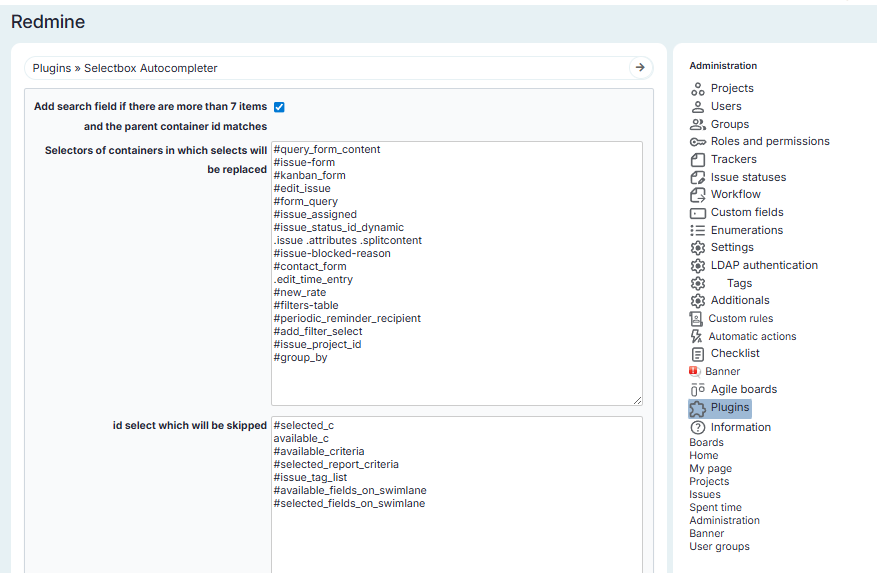
Under Administration → Modules → Selectbox Autocompleter you can configure:
- Add a search field if there are more than 7 items and the parent container id matches
- Container selectors in which selects will be replaced
- Selectors that will be skipped
Adding search to select elements
The plugin works as follows:
- It finds
selectelements by the specified id or class of theselect. - It replaces the found
selectelements with search-enabled selects. - It applies only to selectors explicitly specified in the plugin settings.
Example:
If you want to add search for selects located inside the issue form, use the form container id:
#issue-form
In this case:
- The plugin will apply the search to all
selectelements inside the issue form. - All dropdowns on the issue creation and edit pages will display with search.
The selector must be added to the plugin settings and the changes saved.
Ignoring select elements
Some Redmine select elements already include a built-in search.\nTo avoid duplication (two search inputs in a single field), such elements should be ignored.
Example:
#available_c
In this case:
- The plugin detects the
select#available_c. - The plugin will ignore it.
If a select is not added to the exceptions list, two search inputs may appear simultaneously.
Usage
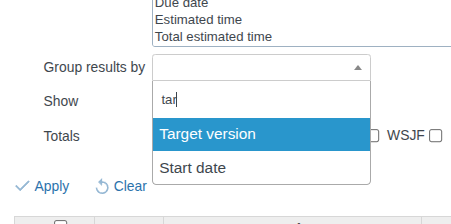
- Click the configured dropdown (for example: on the issues page, the "Group results by" select).
- A search field will appear at the top of the dropdown.
- Start typing a name or title — the list will be filtered automatically, leaving only matching options.