

Last updated: 8/26/2026
User Group Editor
Description
The User Group Editor plugin extends Redmine's standard user group management capabilities by providing a convenient interface for quickly editing group membership.
Key Features
- Quick user search
- Group membership management
- Restriction on editing selected groups
Compatibility
Redmine: 5.1 - 7.0
Web browsers: Chrome, Firefox, Safari, Edge
Databases: MySQL 5.7, MySQL 8.0, PostgreSQL 14-16, SQLite
Plugins: redmine_kanban, redmine_advanced_checklists, advanced_charts, appearance_custom, module_manager, periodic_reminder, advanced_workflow, queries_perfect, selectbox_autocompleter, cost_calculator.
Installation and Update
- Remove the old plugin version
redmine/plugins/if it exists:
cd redmine/plugins
rm -r user_group_editor
- Copy the new
user_group_editorfolder intoredmine/plugins/. - Stop and start Redmine. (On some Redmine setups, for example Docker, it is important to stop and then start the server rather than performing a restart.)
Removal
- Remove the
user_group_editorfolder fromredmine/plugins/:
rm -r user_group_editor
- Stop and start Redmine.
Configuration
- Check and adjust plugin settings at Administration → Modules → User Group Editor.
Administration
"Modules" section
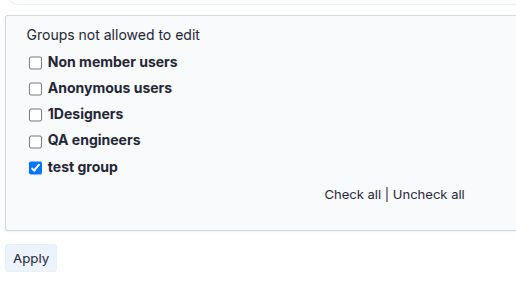
To configure the plugin, go to: Administration → Plugins → User Group Editor
In the plugin settings you can:
- Select groups for which editing is forbidden
Usage
Plugin functionality
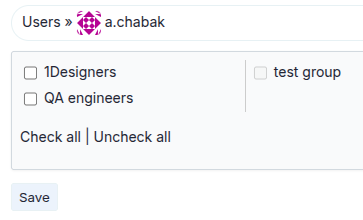
The plugin enhances Redmine's standard interface for managing user groups.
- Navigate from the top menu → User Groups.

- Click the desired user.
- In the "Groups" section, choose the groups the user should belong to.
- Click "Save".
Only administrators have access to user group management.