Queries Perfect
Description
Queries Perfect is a Redmine plugin that extends filtering and grouping capabilities.
Key Features
- Adds OR and AND logic to issue filters
- Adds issue grouping by parent and root
- Adds new filters and columns to issue lists and time entries
Compatibility
Redmine: 5.1 - 7.0
Web Browsers: Chrome, Firefox, Safari, Edge
Databases: MySQL 5.7, MySQL 8.0, PostgreSQL 14-16, SQLite
Plugins: advanced_workflows, redmine_kanban, redmine_advanced_checklists, advanced_charts, appearance_custom, module_manager, periodic_reminder, user_group_editor, selectbox_autocompiler, cost_calculator.
Installation and Update
-
Remove the old version of the plugin from Redmine, if it exists.
cd redmine/plugins rm -r queries_perfect -
Copy the new plugin folder queries_perfect to redmine/plugins/
-
Run migrations in the root folder of Redmine
bundle exec rake redmine:plugins:migrate RAILS_ENV=production NAME=queries_perfect -
Stop and start Redmine. (For some Redmine installations (e.g., in Docker), it is important to stop and start the server rather than just restart it.)
Uninstallation
- Execute the uninstallation command in the root folder of Redmine
bundle exec rake redmine:plugins:migrate RAILS_ENV=production NAME=queries_perfect VERSION=0
- Delete the queries_perfect plugin folder from redmine/plugins/
rm -r queries_perfect
- Stop and start Redmine.
Configuration
This plugin has no configuration settings.
Glossary
-
Root issue - the topmost parent in the subtask hierarchy. For any child issue, it is the root element from which the entire nested chain originates. (If an issue has no subissues, it is its own root issue.)
>root_issue
  \_ child1
    \_ subchild1
    \_ subchild2
Plugin Features
Issues Section
Extended functionality
-
New columns
- Root issue
- Spent time variance
- Parent project
- Parent status
- Root status
- Root due date
- Parent due date
-
New filters
- Root issue:
- Root issue ID
- Root status
- Root tracker
- Root project
- Root due date
- Root blocked
- Parent issue:
- Parent tracker
- Parent status
- Parent project
- Subissues:
- Subtask tracker
- Subtask project
- Subtask blocked
- OR filters:
- AND any following
- OR any following
- OR all following
- start/end block AND
- start/end block OR
- Root issue:
- Totals field: Spent time variance
- Grouping by root issue and parent issue
- Option "Me, excluding groups" in the Assignee filter
- Option "Issue project" in the Parent project filter
Usage
Filters
- AND any following: all subsequent filters will be joined with OR and grouped in parentheses.

- OR any following: all subsequent filters will be joined with OR and grouped in parentheses, prefixed with OR.

- OR all following: all subsequent filters will be joined with AND and grouped in parentheses, prefixed with OR.

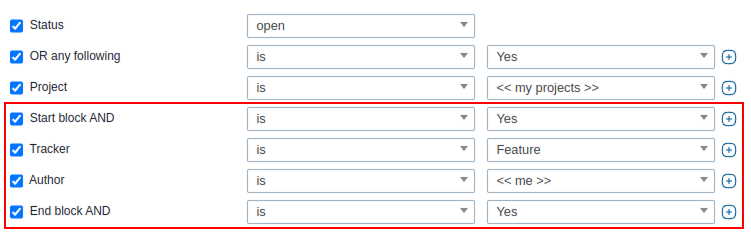
- start/end block AND: creates a logical group where all conditions inside must be satisfied (AND logic).
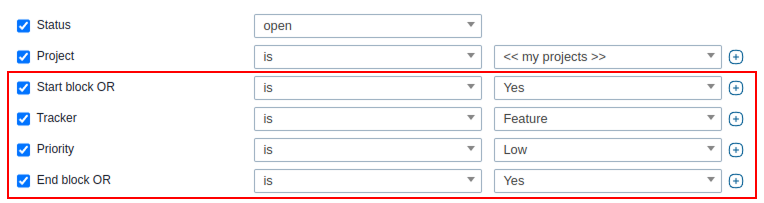
- start/end block OR: creates a logical group where at least one condition must be satisfied (OR logic).
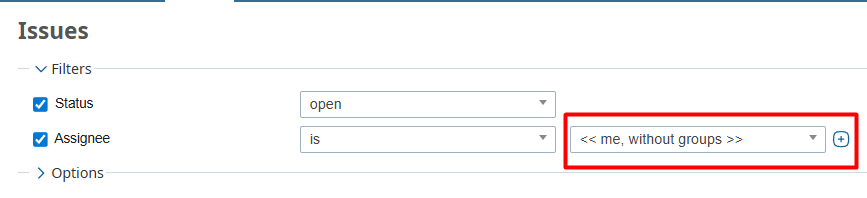
- In the Assignee filter, the new option "Me, excluding groups" shows only issues assigned directly to the current user, excluding those assigned to groups the user belongs to.
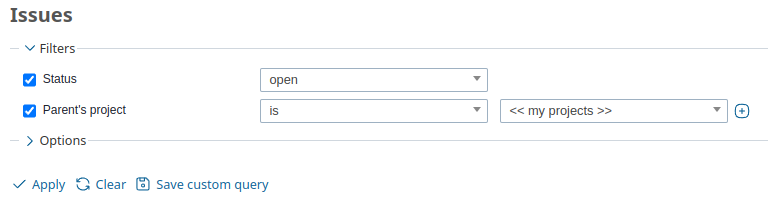
- In the Parent project filter, the new option "Issue project" shows only issues whose project differs from that of their parent issue.
Grouping
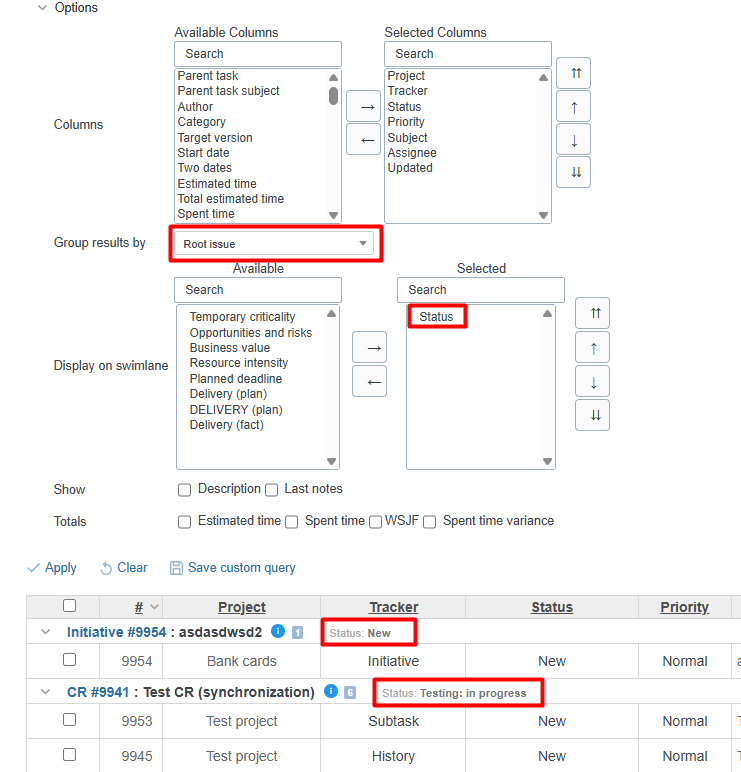
The plugin adds issue grouping by parent and root.
When grouping issues by parent or root issue, an additional option, "Display on swimlane" becomes available.
This option allows displaying custom field values of type "List" and/or the issue Status for the parent/root issue on the swimlane:
Total fields
The total field "Spent time variance" calculates the difference between the estimated time and the actual time entries.

Time Entries Section
Extended functionality
-
Columns
- Unique ID
- Subject
-
Filters
- Unique ID
- Text: Subject
- Grouping by root issue and parent issue
Usage
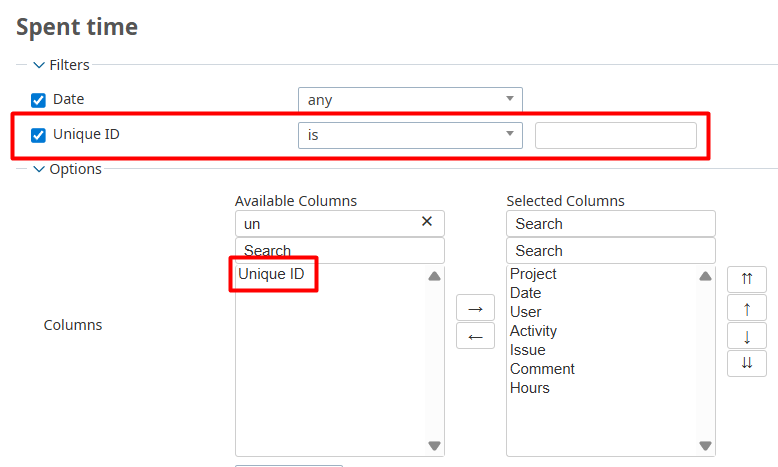
On the Time Entries page, the columns "Unique ID" and "Subject" are added, along with corresponding filters "Unique ID" and "Text: Subject", allowing users to search time entries by the associated issue's ID or subject.
Administration
Custom Fields Section
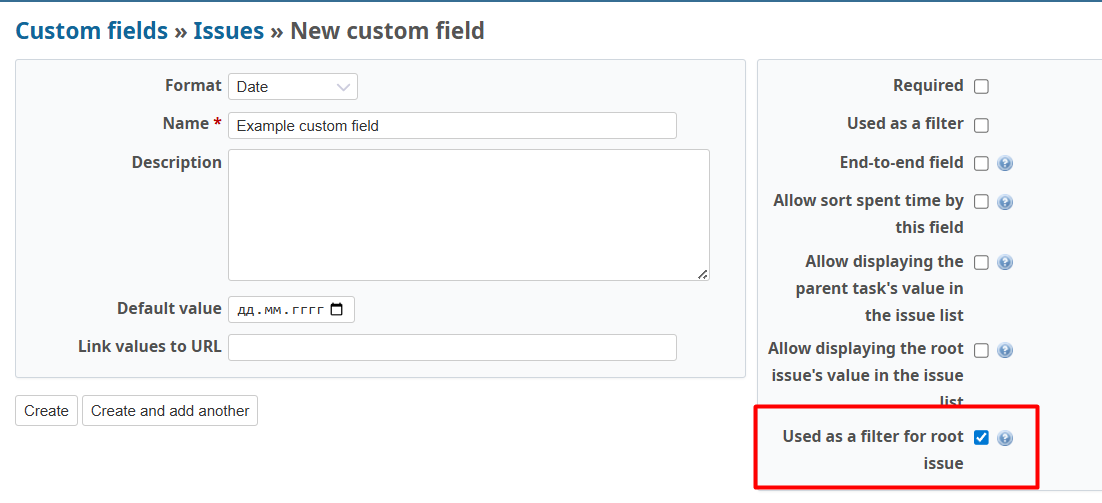
The Queries Perfect plugin extends the capabilities of custom fields of type "Date". When creating or editing such a field, the following option appears:
"Used as a filter for root issue"
If enabled, in addition to the standard filter for this field, a dedicated filter named <FIELD_NAME> root will be added to the global filter list.